Kokoyi Quickstart
Kokoyi allows you to program a model as if you write the math underlying the model: precise and compact. In the current release we have included a lot of models: MLP/CNN classifiers, seq2seq model (including the popular Transformer), variants of Reinforcement Learning (policy gradient and Deep Q-Learning), variational auto-encoder (VAE), and GAN, with more to come in the future. Be sure to check them out.
Before diving into the model implementation, let us first get familiar with how to write math equations in the style of LaTeX, which you can easily adapt to write a Kokoyi model. In order to do so, this notebook is designed as a series of mini-exercises.
Variables: from LaTeX to Kokoyi
Assuming you have installed Kokoyi plug-in, you can start programming with LaTeX syntax right away. Otherwise, you may want to check out LaTeX math and equations for a quick intro. LaTeX supports a wide range of mathematical symbols, letters, fonts, accents, etc, which are all available in Kokoyi.
Suppose we wish to have three variables $\phi \gets 1$, $x_{first} \gets \frac{1}{2}$, $\hat{x} \gets x_{first} + 2$. Defining them in Kokoyi is a snap. First, double click here and copy everything between the math delimiters \$. Second, paste them to the box below and append each definition with a newline symbol \\.
% Please enter your answer in this box.
\phi \gets 1 \\
x_{first} \gets \frac{1}{2} \\
\hat{x} \gets x_{first} + 2 \\
Click to reveal the answer.
\phi \gets 1 \\
x_{first} \gets \frac{1}{2} \\
\hat{x} \gets x_{first} + 2 \\
In Kokoyi, \gets defines the the left side variable with the right side expression; Kokoyi statements need to be ended with a newline symbol \\, just like semicolon ; in C/C++.
That's it! And you will notice that what you have typed will automatically be displayed as math equations. The correct answer should look like this: $ \phi \gets 1 \\ x_{first} \gets \frac{1}{2} \\ \hat{x} \gets x_{first} + 2 \\ $
Let's do something fancier; note how you can insert comments for readability:
\theta \gets (0, (1, 2)) \\
\Comment{define multiple variables together} \\
(x, (y, z)) \gets \theta \\
(\lambda, \mu) \gets (0, 1) \\
Call Kokoyi in Python
Kokoyi uses a dictionary kokoyi.symbol as a symbol table. Once you defined a variable x, you can access it in kokoyi.symbol['x']:
print(kokoyi.symbol['\phi'])
print(kokoyi.symbol['x_{first}'])
print(kokoyi.symbol['\hat{x}'])
print(kokoyi.symbol['\theta'])
Array
Array (or multi-dimensional Tensor) describes a collection of elements of the same type. This is probably one of the most useful data abstraction; for instance, we use it to model sequence data and build modules with stacked submodules.
The basics
We adopt a common convention to express a collection of elements mathematically with the \{ element \} ^ { shape } syntax, displayed as $\{ element \} ^ {shape}$ (the backslashes before the braces are necessary because brace is a special symbol in LaTeX). Try to use this syntax to define a constant array $x$ of value 2 with shape $3 \times 5$ in the box below (use \times to add dimensions):
% Please enter your answer in this box.
x \gets \{2\}^{3\times 5}  \\
Click to reveal the answer.
x \gets \{2\}^{3\times 5} \\
\GetShape returns the shape of a tensor or array, whereas a pair of | is a shortcut that returns dimension 0, which is the length of an array.
S \gets \GetShape(x) \Comment{Get the size of an array} \\
L \gets |x| \Comment{Get the length of the first dimension} \\
print(kokoyi.symbol['x'])
print(kokoyi.symbol['S'])
print(kokoyi.symbol['L'])
Array elements can of course be non-constant. For instance, the value may depend on the index This brings up syntax like \{ element-expr \}_{index-lower-bound}^{index-upper-bound}. For example, $y \gets \{i\}_{i=0}^{4}$ defines an array of integer ranging from 0 to 4 (both inclusive). Try to define a new array $y^{even}$ that contains even integers within ten in the box below:
% Please enter your answer in this box.
y^{even} \gets \{2 * i\}_{i=0}^{5}  \\
Click to reveal the answer.
y^{even} \gets \{2 * i\}_{i=0}^{5} \\
print(kokoyi.symbol['y^{even}'])
Array expressions can be nested to compose a high-dimensional matrix (or called tensor). Try in the box below to define a $5\times5$ Hilbert matrix $H$, where each element is $\frac{1}{i + j -1}$ and $i, j$ are row and column indexes.
% Please enter your answer in this box.
H \gets \{ \{ \frac{1}{i+j-1} \}_{j=1}^{5}\}_{i=1}^{5} \\
Click to reveal the answer.
H \gets \{ \{ \frac{1}{i+j-1} \}_{j=1}^{5}\}_{i=1}^{5} \\
print(kokoyi.symbol['H'])
Concatenate
You can concatenate two arrays $a$ and $b$ with a||b in Kokoyi; contatenation happens on the 1st dimension of the arrays (and tensors too). Let's use this to concat two $H$ into $H_2$ and check the shape.
% Please enter your answer in this box.
H_2 \gets H || H \\
size_{H_2} \gets \GetShape(H_2) \\
Click to reveal the answer.
H_2 \gets H || H \\
size_{H_2} \gets \GetShape(H_2) \\
print(kokoyi.symbol['H_2'])
print(kokoyi.symbol['size_{H_2}'])
Indexing, slicing and recursion
Sequence data is the most useful when there are dependencies. For example, a language model computes the probability $p(s)$ of a sentence $s = \{x_1, x_2, ..., x_T\}$ by factorizing it as a product of a series of conditional probabilities: $p(s) = \prod_{t=1}^T p(x_t|x_{<t})$.
Indexing: This brings the issue of expressing indexing (slicing). There is no standard way to do indexing in LaTeX. Kokoyi draws inspiration from programming languages such as Python and uses the succinct syntax with brackets (e.g., array[index]): you code A[i] to get the $i^{th}$ element, and it will be displayed as $A_{[i]}$. Note that array elements are still indexed from zero in Kokoyi.
Try in the box below to define an array $\hat{y}^{even}$ by transforming the array $y \gets \{i\}_{i=0}^{4}$.
% Please enter your answer in this box.
y \gets \{i\}_{i=0}^{4} \\
\hat{y}^{even} \gets \{2 * y[i]\}_{i=0}^{4}  \\
Click to reveal the answer.
y \gets \{i\}_{i=0}^{4} \\
\hat{y}^{even} \gets \{2 * y[i]\}_{i=0}^{4}  \\
Slicing. Use A[i:j] to slice elements A[i], A[i+1], ... A[j-1]:
y_{slice} \gets y[0:2] \\
print(kokoyi.symbol['y_{slice}'])
Recursion: There are arrays defined by recursion. For example, we can rewrite $y \gets \{i\}_{i=0}^{4}$ using the recursive array syntax in Kokoyi:
y^{rec}[0 \leq i \leq 4] \gets
  \begin{cases}
    0 & i = 0 \\
    y[i-1] + 1 & otherwise \\
  \end{cases} \\
, which will be displayed as:
$ y^{rec}_{[0 \leq i \leq 4]} \gets \begin{cases} 0 & i = 0 \\ y_{[i-1]} + 1 & otherwise \\ \end{cases} \\ $
Compared with a regular array definition, recursive arrays have two additional requirements:
- Specify the index $i$ and its lower and upper bound in the definition before $\gets$. Kokoyi will calculate the element value from the lower bound to the upper bound.
- Specify the body with a branch structure to the right of $\gets$ which includes the termination condition (e.g., $i=0$) and the transition expression (e.g., $y_{[i-1]} + 1$).
It's more straightforward than you think: you write out the transition first (on the right hand side), then specify the iteration condition (on the left hand side).
Let us give it a try. In the box below, define an array $F$ containing the famous Fibonacci number, $F[i] = F[i-1] + F[i-2]$.
F[0 \leq i \leq 10] \gets
  \begin{cases}
    0 & i = 0 \\
    1 & i = 1 \\
    F[i-1] + F[i-2] & otherwise \\
  \end{cases} \\
Click to reveal the answer.
F[0 \leq i \leq 10] \gets
  \begin{cases}
    0 & i = 0 \\
    1 & i = 1 \\
    F[i-1] + F[i-2] & otherwise \\
  \end{cases} \\
print(kokoyi.symbol['F'])
Multiple arrays
Some more (and fancier) examples below. For multiple arrays with potential mutual dependencies, you will need to use begin{group} and end{group} so Kokoyi compiler can infer them appropriately; we will see such an application in LSTM.
Note that the iteration is specified in the subscript, i.e. $a_{[0 \leq i \leq 5]}$ and $b_{[0 \leq i \leq 5]}$, which makes you wonder what happened if $i$ is zero, won't accessing $b_{[-1]}$ be out of bound? The answer is that $a_{[0]} \leftarrow 0$, as a shortcut, specifies the boundary condition.
\Comment{Define a constant array of shape (5, 5) with values } \\
A \gets \{\Exp(1)\}^{5 \times 5} \\
u \gets A[0:2, 0:3] \Comment{Slice a 2x3 top-left corner} \\

\Comment{Define two (or more) mutually dependent arrays, and the order of equations doesn't matter within the group syntax}\\
\begin{group}
    a[0 \leq i\leq 5] \gets b[i-1] * 2, a[0] \gets 0 \\
    b[0 \leq i\leq 5] \gets a[i-1] + 1, b[0] \gets 0\\
\end{group}
print(kokoyi.symbol['A'])
print(kokoyi.symbol['u'])

print(kokoyi.symbol['a'])
print(kokoyi.symbol['b'])
Ragged array
Also known as jagged array is an array of arrays of which member arrays can have different length. This handy if you want to compute some property (e.g. a distribution) per member array.
\Comment{Define a ragged array, where the member arrays can be of different lengths} \\
C \gets \{ \{i +j\}_{j=1}^i\}_{i=1}^5 \\
print(kokoyi.symbol['C'])
Reduction/Aggregation
Reduction operators like $\sum$ and $\prod$ are supported in Kokoyi. For example, we can sum the Fibonacci array $F$ by \Sum_{i=0}^{10} {F[i]}. The only difference with Latex's syntax is there are braces around the reduced element.
Try to use this syntax to sum the array $A$ in the box below:
% Please enter your answer in this box.
S \gets \Sum_{i=0}^{4} {\Sum_{j=0}^{4} {A[i,j]}} \\
Click to reveal the answer.
S \gets \Sum_{i=0}^{4} {\Sum_{j=0}^{4} {A[i,j]}} \\
print(kokoyi.symbol['S'])
Functions
Let us now move to define a function commonly used as the activation function in neural networks, called Sigmoid function. Mathematically, it is
$$ Sigmoid(x) \gets \frac{1}{1 + e^{-x}} $$, where $e$ is Euler's number). Kokoyi uses very similar syntax. First, double click here and copy-paste the math equation to the code cell below. Second, append it with a newline symbol \\ and replace the exponential with \exp(-x). Here, the \exp is an built-in function of Kokoyi, which computes the power of Euler's number.
The result should look like this: $ \newcommand{\Op}[1]{{\color{blue}{\mathrm{#1}}}} \def\exp{\Op{exp}} $ $ Sigmoid(x) \gets \frac{1}{1 + \exp(-x)} \\ $
% Please enter your answer in this box.
Sigmoid(x) \gets \frac{1}{1 + \exp(-x)} \\
Click to reveal the answer.
Sigmoid(x) \gets \frac{1}{1 + \exp(-x)} \\
We can execute a function foo by calling kokoyi.symbol['foo'], passing whatever arguments it may require. Let's compare our $Sigmod$ Function with torch.sigmod; they should be identical because Kokoyi compiler links to PyTorch modules and functions.
x = torch.tensor([1, 2, 3])
kokoyi_var = kokoyi.symbol['Sigmoid'](x)
torch_var = torch.sigmoid(x)
print(kokoyi_var)
print(torch_var)
Let's apply this to the Kokoyi array H:
print(kokoyi.symbol['H'])
print(kokoyi.symbol['Sigmoid'](kokoyi.symbol['H']))
Branches
Math world has no if-else statement. Instead, people list cases using big right brace symbol. In fact you have already used it in defining recursive arrays. In LaTeX, it is written as:
x \gets
  \begin{cases}
    value1 & condition1 \\
    value2 & condition2 \\
    ... \\
    valueN & otherwise \\
  \end{cases}
, which is displayed as
$ x \gets \begin{cases} value1 & condition1 \\ value2 & condition2 \\ ... \\ valueN & otherwise \\ \end{cases} $
This is also how to write branches in Kokoyi. Let us try to define the famous ReLU activation function in the box below. The correct output should look like this:
$ ReLU(x) \gets \begin{cases} x & x > 0 \\ 0 & otherwise \\ \end{cases} $
% Please enter your answer in this box.
ReLU(x) \gets
  \begin{cases}
    x & x > 0 \\
    0 & otherwise \\
  \end{cases} \\
Click to reveal the answer.
ReLU(x) \gets
  \begin{cases}
    x & x > 0 \\
    0 & otherwise \\
  \end{cases} \\
Modules
Perhaps the most useful abstraction in deep learning world is module, which maps to a familiar pattern such as $f(x; \theta)$, where $x$ is the input and $\theta$ is the parameters to be learned. We extend the syntax such that you can include a learnable submodule M with $f(x; M)$, i.e. $\theta$ is within the submodule. We will have plenty time to learn how to write them in other notebooks so we will just settle with a very simple intro here.
Let's first write a linear transformation module $Linear(x; W, b) \gets W \cdot x + b$, where $x$ is the input data while $W$ and $b$ are learnable parameters so they are separated by the semicolon symbol. Realizing it in Kokoyi takes three steps:
- Use the
\Module{name}{inputs; params}module-body\EndModulesyntax to define the module. - Copy-and-paste the formula after
\gets ...into the module body and assign it to a new variable $y$. - Use the
\Returnkeyword to mark the return value.
You can give it a try below. The correct answer should look like this: $ \newcommand{\Module}[2]{\rule[0pt]{160mm}{1.0mm}\\ \textbf{Module}\quad\mathrm{#1}(#2)\\ \rule[0pt]{160mm}{1.0mm}\\} \def\EndModule{\rule[0pt]{160mm}{1.0mm} \\} \def\Return{{\bf Return} \quad} $ $ \Module{Linear}{x; W, b} y \gets W \cdot x + b \\ \Return y \\ \EndModule $
% Please enter your answer in this box.
\Module{Linear}{x; W, b}
    y \gets W \cdot x + b \\
    \Return y \\
\EndModule
Click to reveal the answer.
\Module{Linear}{x; W, b}
    y \gets W \cdot x + b \\
    \Return y \\
\EndModule
We have written our module in Kokoyi, it defines the forward functions of the module. All we need to now is to complete the initialization part in PyTorch. Let's have a try on the $Linear$ module.
from torch import nn
class Linear(torch.nn.Module):
    def __init__(self, in_dim, out_dim):
        super().__init__()
        self.W = nn.Parameter(torch.rand(out_dim, in_dim))
        self.b = nn.Parameter(torch.zeros(out_dim))

    def get_parameters(self):
        # The order of returned parameters should be the same as the order of params in Kokoyi code
        return self.W, self.b

    forward = kokoyi.symbol['Linear']
However, you can also let Kokoyi set it up and just do some filling. To do so, while on a cell of a Kokoyi module, just hit the button at the top manual.
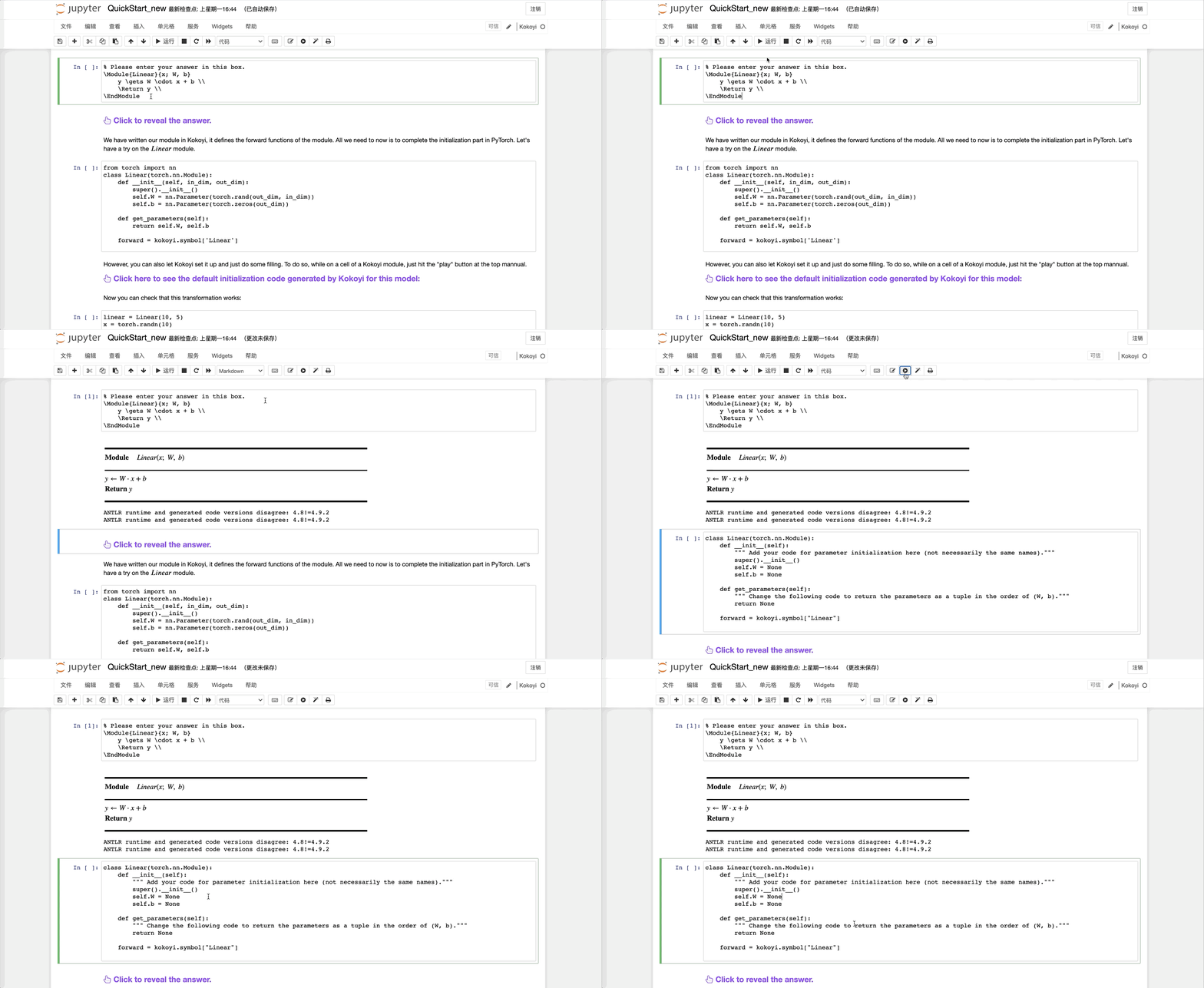
Click here to see the default initialization code generated by Kokoyi for this model:
class Linear(torch.nn.Module):
    def __init__(self):
        """ Add your code for parameter initialization here (not necessarily the same names)."""
        super().__init__()
        self.W = None
        self.b = None

    def get_parameters(self):
        """ Change the following code to return the parameters as a tuple in the order of (W, b)."""
        return None

    forward = kokoyi.symbol["Linear"]
Now you can check that this transformation works:
linear = Linear(10, 5)
x = torch.randn(10)
y = linear(x)
print(y.shape)
print(y)
Congratulations for passing all the quiz! You are welcomed to go through the Kokoyi Cheat Sheet for more advanced usages. You should start the MLP_CNN notebook notebook next.
Some gotchas
A careful reader realizes that some of Kokoyi's syntax is different than LaTeX and rendered differently. For most part, this is to simplify the development. Here we list some of them, in addition to some useful operators to remember:
| Kokoyi | Kokoyi render | LaTex render | Meaning |
|---|---|---|---|
A[i] |
$A_{[i]}$ | $A[i]$ | Array indexing |
A_s[i] |
$A_{s[i]}$ | $A_s[i]$ | Subscript and array indexing will be merged |
a * b |
$a \times b$ | $a * b$ | Element-wise product |
a \circ b |
$ a \circ b $ | $ a \circ b $ | Element-wise product |
a \times b |
$ a \times b $ | $ a \times b $ | Array Shape Definition |
a ** b |
$a^b$ | $a ** b$ | Power |
\|a\| |
$\|a\|$ | $\|a\|$ | L-2 Norm |
\|a\|_ p |
$\|a\|_p$ | $\|a\|_p$ | L-p Norm |
a||b |
$a||b$ | $a||b$ | Concat |